


Alert 1 of 0
See all alerts
Branch Closure
Branch Closure Icon

All Jeanne D’Arc Credit Union locations will be closing at 2PM on Thursday, December 24th in observance of Christmas Eve and will remain closed on Friday, December 25th in observance of Christmas Day. ... Read more

Branch Closure
Branch Closure Icon

All Jeanne D’Arc Credit Union locations will be closed on Thursday, November 26th in observance of Thanksgiving.

Branch Closure
Branch Closure Icon

All Jeanne D’Arc Credit Union locations will be closed on Wednesday, November 11th in observance of Veterans Day.

Branch Closure
Branch Closure Icon

All Jeanne D’Arc Credit Union locations will be closed on Monday, October 12th in observance of Columbus Day.

Branch Closure
Branch Closure Icon

All Jeanne D’Arc Credit Union locations will be closed on Monday, September 7th in observance of Labor Day.

Branch Closure
Branch Closure Icon

All Jeanne D’Arc Credit Union locations will be closed on Saturday, July 4th in observance of Independence Day.

Branch Closure
Branch Closure Icon

All Jeanne D’Arc Credit Union locations will be closed on Friday, June 19th in observance of Juneteenth.

Branch Closure
Branch Closure Icon

All Jeanne D’Arc Credit Union locations will be closed on Monday, May 25th in observance of Memorial Day.

Branch Closure
Branch Closure Icon

All Jeanne D’Arc Credit Union locations will be closed on Monday, February 16th in observance of Presidents’ Day.

Branch Closure
Branch Closure Icon

All Jeanne D’Arc Credit Union locations will be closed on Monday, January 17th in observance of Martin Luther King Jr. Day.

Branch Closure
Branch Closure Icon

All Jeanne D’Arc Credit Union locations will be closed on Thursday, January 1st in observance of New Year’s Day.

Branch Closure
Branch Closure Icon

All Jeanne D’Arc Credit Union locations will be closing at 2PM on Wednesday, December 24th in observance of Christmas Eve and will remain closed on Thursday, December 25th in observance of Christmas Day. ... Read more

Notice
Notice Icon

Our Member Contact Center will be closing at 5PM on Wednesday, December 17th, due to a staff event. We apologize for any inconvenience this may cause. ... Read more

Back to Blog

Adding An Online Banking Account Nickname That Did Not Carry Over
Press Releases - Image logo

Here are the details on how to update a nickname in online banking if by chance a member’s nickname did not carry over:

After logging into online banking > Find the More Widget & Choose the Settings Widget

nicknames

Once settings opens select the Accounts Tab from the top menu:

nicknames

When the accounts page loads – locate the account to update the nickname & select the edit pencil at the far right of the account

nicknames

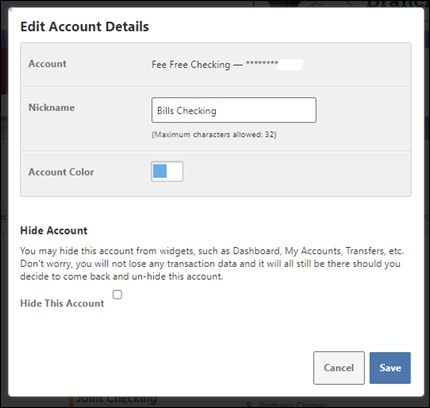
Enter the nickname into the nickname field and select save.
nicknames 

Please contact our Member Contact Center for further assistance at 978.452.5001

Related Articles