


Alert 1 of 0
See all alerts
Branch Closure
Branch Closure Icon

All Jeanne D’Arc Credit Union locations will be closing at 2PM on Thursday, December 24th in observance of Christmas Eve and will remain closed on Friday, December 25th in observance of Christmas Day. ... Read more

Branch Closure
Branch Closure Icon

All Jeanne D’Arc Credit Union locations will be closed on Thursday, November 26th in observance of Thanksgiving.

Branch Closure
Branch Closure Icon

All Jeanne D’Arc Credit Union locations will be closed on Wednesday, November 11th in observance of Veterans Day.

Branch Closure
Branch Closure Icon

All Jeanne D’Arc Credit Union locations will be closed on Monday, October 12th in observance of Columbus Day.

Branch Closure
Branch Closure Icon

All Jeanne D’Arc Credit Union locations will be closed on Monday, September 7th in observance of Labor Day.

Branch Closure
Branch Closure Icon

All Jeanne D’Arc Credit Union locations will be closed on Saturday, July 4th in observance of Independence Day.

Branch Closure
Branch Closure Icon

All Jeanne D’Arc Credit Union locations will be closed on Friday, June 19th in observance of Juneteenth.

Branch Closure
Branch Closure Icon

All Jeanne D’Arc Credit Union locations will be closed on Monday, May 25th in observance of Memorial Day.

Branch Closure
Branch Closure Icon

All Jeanne D’Arc Credit Union locations will be closed on Monday, February 16th in observance of Presidents’ Day.

Branch Closure
Branch Closure Icon

All Jeanne D’Arc Credit Union locations will be closed on Monday, January 17th in observance of Martin Luther King Jr. Day.

Branch Closure
Branch Closure Icon

All Jeanne D’Arc Credit Union locations will be closed on Thursday, January 1st in observance of New Year’s Day.

Branch Closure
Branch Closure Icon

All Jeanne D’Arc Credit Union locations will be closing at 2PM on Wednesday, December 24th in observance of Christmas Eve and will remain closed on Thursday, December 25th in observance of Christmas Day. ... Read more

Notice
Notice Icon

Our Member Contact Center will be closing at 5PM on Wednesday, December 17th, due to a staff event. We apologize for any inconvenience this may cause. ... Read more

Back to Blog

Viewing Your FICO® Score in Jeanne D’Arc Credit Union Online Banking

To view your FICO® Score in your online banking, click FICO® Score from the left-side menu, then accept the disclosure.

Note
If you are using a desktop computer, and you do not see the FICO® Score menu option, it may be located within the More… option, or you may have to add it to your menu. To add it, click the More… button and select Widget Options. Under “Available”, find the FICO® Score option and click “Add”.

If you are using our mobile app and do not see the FICO® Score option in the left-side menu, follow the previous instructions for adding it from the Widget Options on desktop.

Once you accept the disclosure, you are enrolled in our free FICO® Score service.

Your score will be updated each quarter. After you enroll, you will see the below message until the FICO® Scores are updated in our system the following quarter. You can check back once we update the FICO® Scores, and from that point on, your score will always be available to view.
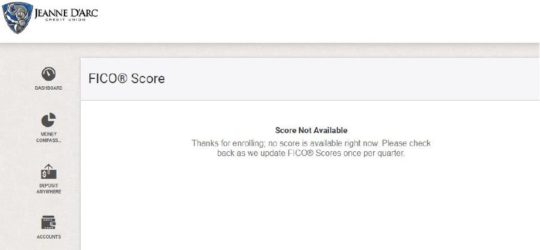
How to view your FICO Score

If you decide you would like to unenroll once your score becomes available, you can do so at any time by clicking the link to opt out. You can opt back in at any point by accessing the FICO® Score menu option again and accepting the disclosure.
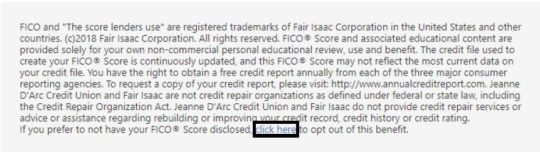
Unenroll from FICO Score