


Alert 1 of 0
See all alerts
Branch Closure
Branch Closure Icon

All Jeanne D’Arc Credit Union locations will be closing at 2PM on Thursday, December 24th in observance of Christmas Eve and will remain closed on Friday, December 25th in observance of Christmas Day. ... Read more

Branch Closure
Branch Closure Icon

All Jeanne D’Arc Credit Union locations will be closed on Thursday, November 26th in observance of Thanksgiving.

Branch Closure
Branch Closure Icon

All Jeanne D’Arc Credit Union locations will be closed on Wednesday, November 11th in observance of Veterans Day.

Branch Closure
Branch Closure Icon

All Jeanne D’Arc Credit Union locations will be closed on Monday, October 12th in observance of Columbus Day.

Branch Closure
Branch Closure Icon

All Jeanne D’Arc Credit Union locations will be closed on Monday, September 7th in observance of Labor Day.

Branch Closure
Branch Closure Icon

All Jeanne D’Arc Credit Union locations will be closed on Saturday, July 4th in observance of Independence Day.

Branch Closure
Branch Closure Icon

All Jeanne D’Arc Credit Union locations will be closed on Friday, June 19th in observance of Juneteenth.

Branch Closure
Branch Closure Icon

All Jeanne D’Arc Credit Union locations will be closed on Monday, May 25th in observance of Memorial Day.

Branch Closure
Branch Closure Icon

All Jeanne D’Arc Credit Union locations will be closed on Monday, February 16th in observance of Presidents’ Day.

Branch Closure
Branch Closure Icon

All Jeanne D’Arc Credit Union locations will be closed on Monday, January 17th in observance of Martin Luther King Jr. Day.

Branch Closure
Branch Closure Icon

All Jeanne D’Arc Credit Union locations will be closed on Thursday, January 1st in observance of New Year’s Day.

Branch Closure
Branch Closure Icon

All Jeanne D’Arc Credit Union locations will be closing at 2PM on Wednesday, December 24th in observance of Christmas Eve and will remain closed on Thursday, December 25th in observance of Christmas Day. ... Read more

Notice
Notice Icon

Our Member Contact Center will be closing at 5PM on Wednesday, December 17th, due to a staff event. We apologize for any inconvenience this may cause. ... Read more

Back to Blog

Login Security Information

Internet Explorer Content Advisor: Users that have Content Advisor enabled in Internet Explorer will require some changes that need to be made in order to use Internet Banking.

  1. Click on Tools.
  2. Select “Internet Options”
  3. Select the “Content” tab
  4. Select “Settings” and input the Content Supervisor password. (The password was created when Enabling the
  5. Content Advisor, if you have forgotten this password contact Microsoft)
  6. Select “Approved Sites”
  7. Copy and paste the entire login page URL, For example: www.myfi.com/onlinserv/HB
  8. Select “Always” and then click “Apply”
  9. Click “OK” to close the Window.
  10. When logging into Internet Banking, you may see the following message box:
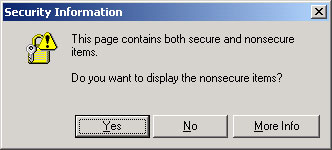
    Security Alert

  11. Select “Yes” to continue.

Additional Third Party Software (TPV): Due to increased security, certain third party toolbars/software may prevent end user access into Internet Banking. This can also include some types of pop-up blockers. In order to log into Internet Banking, this software may need to be disabled or uninstalled. Please refer to the third party vendor instructions for information on how to perform these steps.


Spyware/Adware: Due to increased security, certain spyware/adware may also prevent access into Internet Banking. In order to log into Internet Banking, users must remove this type of software from their computer.

Spyware is Internet jargon for advertising supported software (Adware). It is a way for shareware authors to make money from a product, other than by selling it to the users. Adware typically reports your Internet surfing habits back to a third party site for data collection purposes. In order to protect your financial privacy, it may be necessary to install a spyware/adware search tool to determine if your computer has any of this software installed. If you determine that adware or spyware has been installed on your computer, the software will need to be removed.